Amendments · Version Control

See every change. Miss nothing.

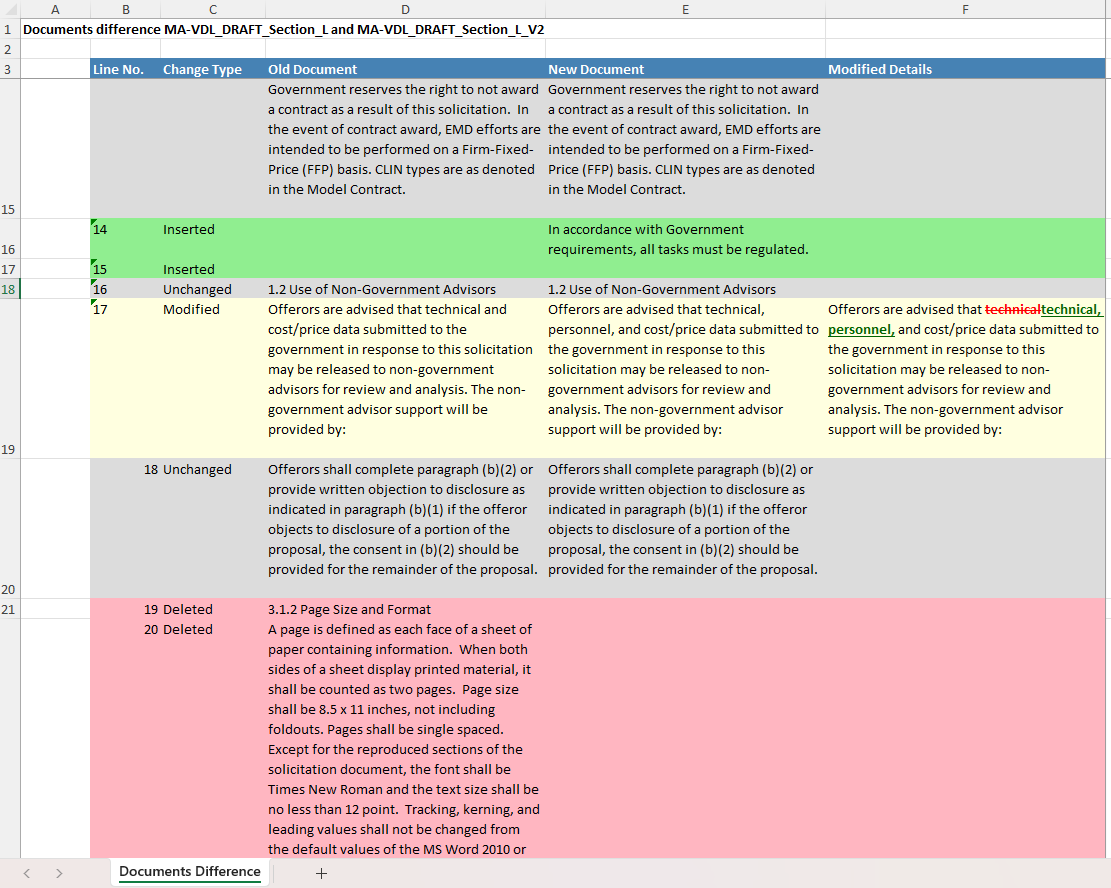
Documents Compare generates a side-by-side, color-coded Excel report of any two document versions — showing exactly what changed, where, and how to assess its impact on your proposal.

Red. Green. Yellow. Done.

A universal color system makes it immediately obvious what happened to every line of text — no training, no interpretation needed.

🔴 RedText was deleted from this version
🟢 GreenNew text was inserted in this version
🟡 YellowExisting text was modified in this version
Compare differnt versions of the same document — RFP and generates a color-coded differnce Excel report
Quickly identify differences between versions of the same document.
When to Use It

Critical moments that need this tool

📬
RFP Amendment Received
Compare the original RFP against the amended version to immediately understand what changed.
📝
Proposal Red Team
Compare pre- and post-review drafts to confirm all review comments were incorporated.
🤝
Teaming Partner Review
Track changes between your version and a partner's version to reconcile differences efficiently.
📋
Contract Modification
Compare contract modifications side-by-side to understand scope changes and their cost implications.

Know what changed. React with confidence.

Stop manually hunting through 200-page documents for amendments. Let Documents Compare do it in seconds.

Free Trial ← All Tools
Often Used With

Related tools

Compliance
Gap Analysis
After tracking amendments, check if your proposal still addresses all new requirements.
Intelligence
Document Insight
Get page-level summaries of the new RFP version before doing a deep compare.